
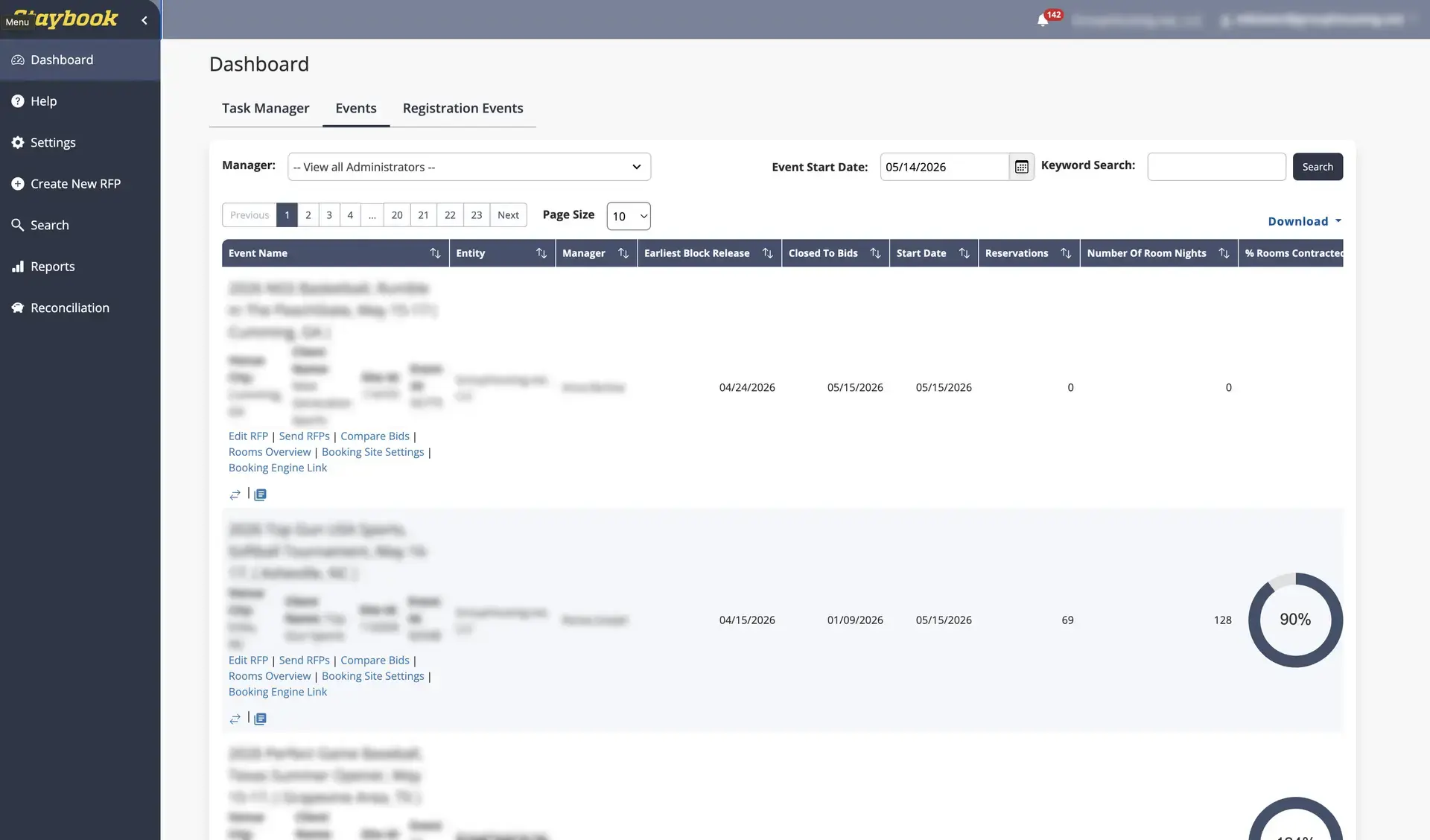
Staybook is Playbook365's event housing management software, designed to help housing companies, rights holders, and event organizers manage the entire event housing lifecycle from a single platform. This article explains what Staybook does, how it connects to Playbook, and the most common questions about how it works.
If you are interested in generating revenue on hotel stays, please contact [email protected]
Overview
Staybook is a dedicated event housing management platform built by Playbook365 to handle hotel sourcing, contracting, room block management, reconciliation, invoicing, and reporting.
Staybook can be used as a standalone housing platform or integrated directly with Playbook365 tournament management software so that event registrations and housing reservations stay connected in one system.
Staybook is designed for:
- Housing companies
- Rights holders
- Tournament directors and event organizers
- Travel planners managing room blocks for sports events
The platform replaces the typical mix of spreadsheets, emails, and disconnected booking tools used to manage event housing.
Where to Find This
Within Playbook, Staybook is connected to an event through the Housing and Travel tab.
Navigation path:
Event Management → Events → Event Name → Housing and Travel tab → Integrated Housing (StayBook)
Staybook itself is a separate platform with its own login. Playbook syncs registration and housing data between the two systems when the integration is enabled.
What Staybook Does
Staybook covers every stage of the event housing process:
1. RFP Management Enter event dates, room types, and concessions to generate a customized RFP. Distribute RFPs to multiple hotels, centralize hotel responses, and compare bids on a single screen.
2. Hotel Sourcing Search a database of over 600,000 hotels. Filter by distance from the event venue, brand, amenities, and rating.
3. Room Block Contracting Finalize negotiated terms with digital e-signature contracting. Contract multiple hotels and add rooms post-contracting as team needs change.
4. Room Block Management Monitor pickup in real time, track room block performance and revenue, and make modifications to reservations from one dashboard. GPS Link allows reservations to flow directly into hotel PMS systems.
5. White Label Booking Engine Provide attendees with a branded booking link that can be shared from your website or event page. Attendees view real-time inventory with full hotel details and images.
6. Reconciliation and Invoicing Send an interactive rooming list to participating hotels after the event. Hotels update the list with extended stays, cancellations, and no-shows. Invoices are distributed automatically once reconciliation is complete.
How Staybook Connects to Playbook
When a Playbook event is linked to a Staybook account, the two systems share data so that team registrations and hotel reservations stay aligned.
Key benefits of the integration:
- Registration data automatically syncs to Staybook
- Event operators can see which teams have booked rooms and which have not
- Bulk messages can be sent to teams that have registered but not yet booked
- Hotel reservations are matched to registered teams for faster reconciliation
- Real-time reporting on actuals across both registration and housing
To enable the integration in Playbook:
- Open the event in Event Management → Events.
- Select the Housing and Travel tab.
- Enable the Integrated Housing (StayBook) option.
- Enable automatic registration syncing if you want registrations sent to Staybook automatically.
Field Reference
The Staybook-related fields in Playbook appear in the Housing and Travel tab of the event.
Integrated Housing (StayBook) Enables the Staybook integration for the event. Use this when your housing partner manages room blocks through Staybook.
Automatic Registration Syncing When enabled, team registration data is automatically sent from Playbook to Staybook. This eliminates manual exports.
Stay-to-Play Distance Defines the radius beyond which teams are required to book through the event's housing provider. Works alongside Staybook to enforce housing policy.
Live Inventory Displays available hotel options near the event location to teams and families.
Non-Integrated Housing URL Used only when your housing partner does not use Staybook. Allows you to provide an external booking link instead.
Revenue Models
Staybook supports several housing revenue models so event organizers can choose what fits their business:
- Post-event hotel payments such as commissions and rebates
- Upfront revenue by collecting a flat-rate or percentage markup at the time of booking
- Flat-fee per reservation pricing for technology-first partners
These models can be used to offset reduced hotel commissions and create new revenue streams from each reservation.
Best Practices
- Use Staybook alongside Playbook365 whenever possible to keep registration and housing data in sync.
- Enable automatic registration syncing so your housing team always sees the latest registered teams.
- Set a Stay-to-Play Distance that matches your housing policy to ensure compliance is enforced automatically.
- Share the branded booking link from your event page so attendees book within the block.
- Use the interactive rooming list after the event to speed up reconciliation rather than chasing hotel updates by email.
- If you offer a Hotel Buyout, configure it in the Housing and Travel tab so teams have a clear path to opt out.
Common Issues / FAQ
Who is Staybook for? Staybook is built for housing companies, rights holders, and event organizers who need to manage hotel sourcing, contracting, room blocks, reservations, and reconciliation for sports events and other group travel.
Do I have to use Playbook365 to use Staybook? No. Staybook can be used as a standalone housing platform. However, using both together provides a single dashboard for registrations and housing, real-time visibility, and easier reconciliation.
How does Staybook help find hotels for an event? Staybook provides access to over 600,000 hotels with filtering by proximity to the venue, brand, amenities, rating, room types, and nightly rates. Real-time data ensures pricing and availability are current.
How does Staybook simplify room block management? All contracted inventory is managed from a single interface. Event organizers can monitor pickup, track reservation status, make modifications, add rooms after contracting, and pull additional inventory from OTAs and GDS when contracted blocks fill up.
How does reconciliation work after an event? Staybook sends an interactive rooming list to participating hotels. Hotels update it with extended stays, cancellations, and no-shows, and can chat directly within the list to resolve questions. The final data is used to generate invoices automatically.
Can attendees book their own rooms? Yes. Each event has a white-labeled, branded booking engine. Coaches or team parents can hold a block of rooms for their team, share the link with team members, and let players or families book individually. Each team block is tracked within the larger group block.
Can attendees manage their own reservations? Yes. Participants can request room type changes, request cancellations, and extend their stay directly from the booking engine.
Does Staybook help with reporting and economic impact? Yes. Staybook automatically tracks room nights and generates reports showing the economic impact of an event. These reports can be used to support funding requests, prove value to destinations, and inform future hotel negotiations.
What kind of support does Staybook provide? Staybook includes personalized onboarding, dedicated account managers with experience in travel and hospitality, and ongoing support 365 days a year with fast response times.