
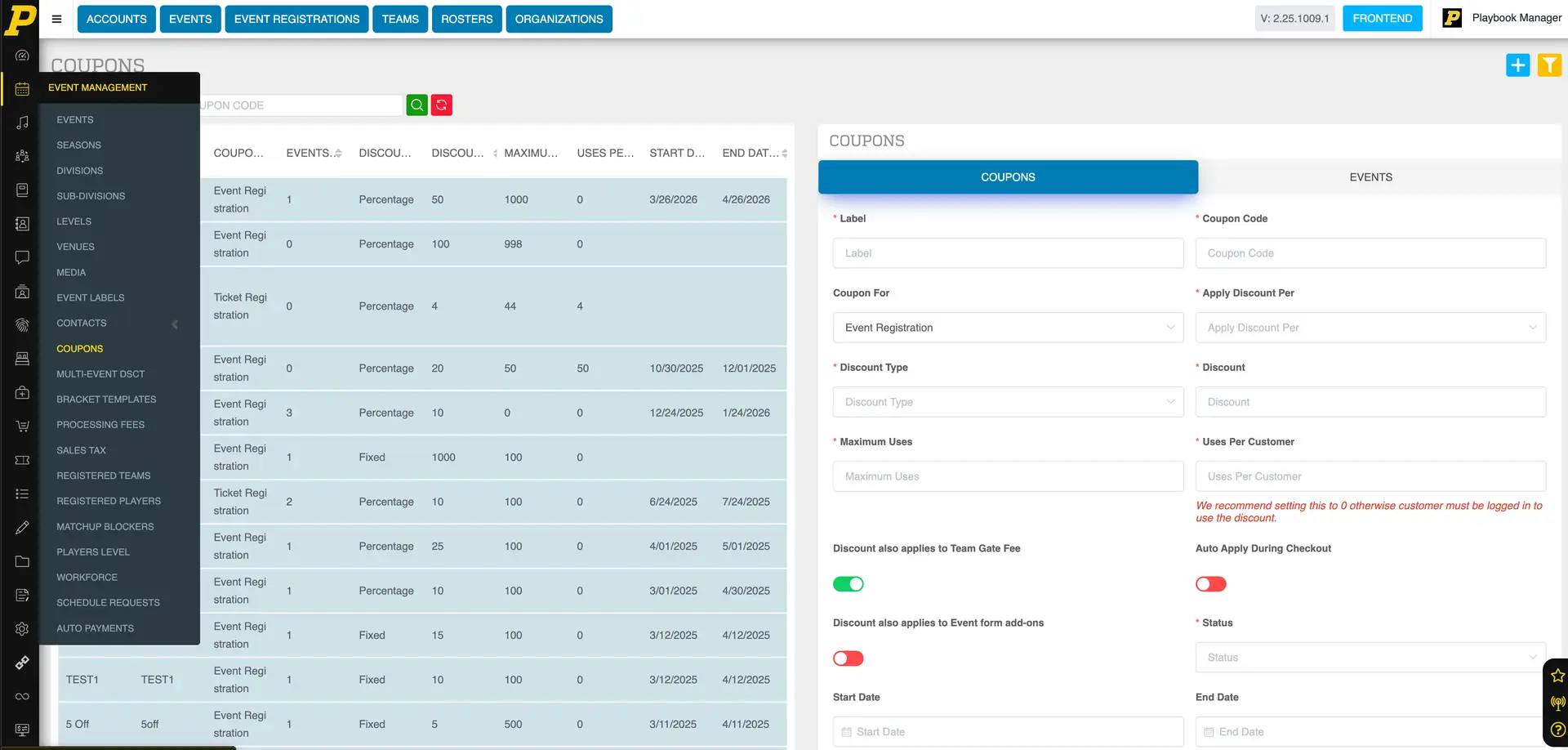
Coupon codes allow you to offer discounts for registrations, whether for all customers or specific teams.
Accessing Coupons
- Navigate to Event Management in the left-hand toolbar
- Click Coupons
- This opens your list of existing coupons
Creating a New Coupon
- Click the blue + button in the top-right corner
- This opens the coupon creation window
Basic Coupon Setup
- Coupon Name: Internal name for tracking
- Coupon Code: Code customers enter at checkout (case-sensitive)
- Coupon For: Select Event Registration
-
Applied Discount Per:
-
Per Order (applies to entire order)
- Per Event (applies per event)
- Sanction Fee (if applicable)
Discount Settings
-
Discount Type:
-
Fixed = dollar amount (e.g., $100 off)
- Percentage = percent off (e.g., 50%)
- Maximum Uses: Total number of times the code can be used
-
Uses Per Customer:
-
1 = one-time use per customer
- 0 = unlimited use per customer
Additional Options
-
Apply to Team Gate Fee:
-
Enabled = discount applies to full order (event + gate fee)
- Disabled = discount applies to event only
-
Apply to Add-Ons:
-
Enabled = discount includes add-ons (e.g., merchandise)
- Disabled = add-ons are full price
-
Auto Apply:
-
Enabled = no code entry required at checkout
Status and Dates
- Status must be set to Active for the coupon to work
- Set Start Date and End Date for when the coupon is valid
Location Restrictions (Optional)
- Limit by country, state, or zip code if needed
Assigning Events
- Click Next
- Select Sport and Season
- Click Search Event
- Select events to apply the coupon to
- (Optional) Expand events to select specific divisions
- Click Finish to save
Editing or Adding Events Later
- Click the Edit (pencil icon) on a coupon
- Go to the Events section
- Add or remove events as needed
Common Issues
- Coupon code already exists: You must create a unique code
-
Coupon not working:
-
Check that status is Active
- Confirm event/division is assigned
- Verify date range is valid
Important Limitation
- Coupon codes cannot be combined with special event pricing
- If both exist, only one discount will apply
- If a larger discount is needed, register the team manually and apply adjustments on the backend invoice
Tips
- Use simple, easy-to-type coupon codes
- Double-check case sensitivity before sharing
- Test the coupon before sending to customers
- Use limits to control usage and prevent over-discounting